
What Is Embossed Printing?
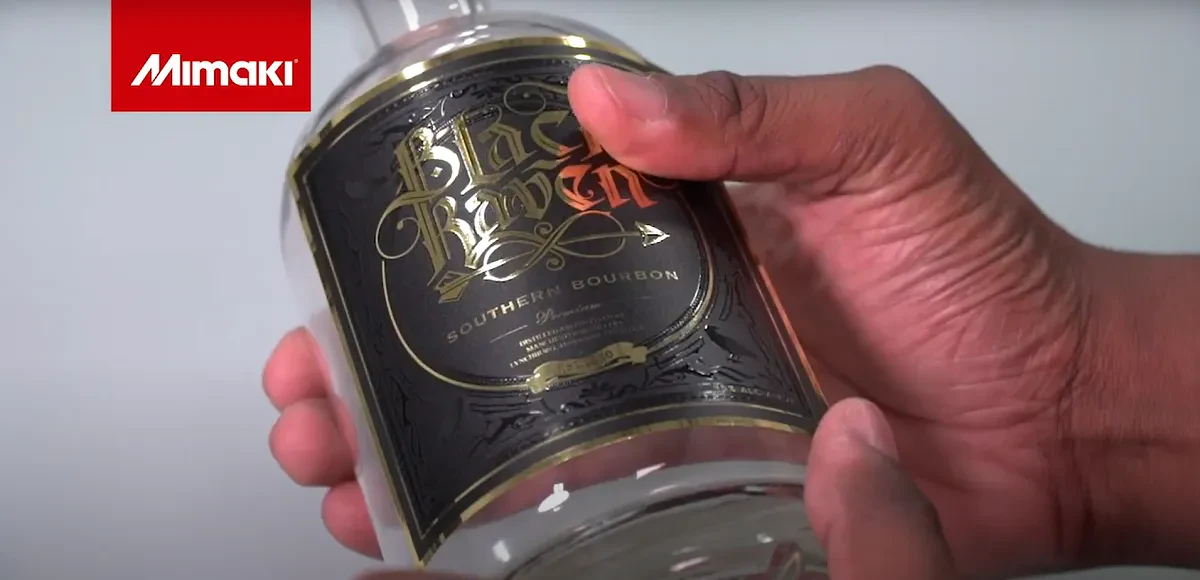
Embossed printing involves creating raised images, which results in a 3D effect. Traditionally, the image is pressed onto the paper or cardstock, but Mimaki offers an easier way to alter an image’s look and texture and achieve a three-dimensional embossed design. This process increases print design possibilities and accommodates a wide range of applications.
How The Embossing Process Works
Mimaki’s embossing process works by layering clear ink on top of the printed image, rather than traditional methods that rely on metal dies. Our LUS-170 clear ink can enhance labels and other printed media to achieve a variety of unique visual effects.
To start, an Illustrator document is created at a desired size. The user loads the design into the file and can then arrange it within the artboard. A clear layer is created by moving any vector objects that will be printed with clear ink (using a single CMYK color) to a new layer.
Once a cut line is created by generating paths around the graphic, save your work. The graphic should have a sized artboard, layer for clear objects, and a layer for cut paths. Save the clear layer separately, and all other layers together as an EPS file.
Applications and Benefits
Embossing is often used to create company logos, as well as initials, eye-catching patterns, and custom illustrations. Contact information can be highlighted as well. The applications for embossed printing include:- Business cards
- Envelopes
- Flyers
- Invitations
- Books
- Letterheads
- Greeting cards
- Certificates
- Brochure covers
- Presentation folders
- Wedding stationery
- Eye-Catching Visuals: Embossed images instantly grab the reader’s attention and draw their eye toward the most important information, or a focal point, on the item.
- The Power of Touch: Embossed printing adds texture, allowing the reader to feel the effect created; it gives images a unique quality.
- Perception of Value: Embossing and finishing give the customer a perception of increased elegance, quality, and value.
How to Create Embossed Labels
With the UCJV300 Series printer as an example, a graphic is created using design software. The designer then creates a new layer where they assign a color to objects representing where clear ink will go later. Cut lines are created with RasterLink tools.The graphic is then loaded into the RIP software. A clear plate is created out of a separate color layer. The printer outputs a layer of color ink, and then automatically prints a layer of clear ink, creating an embossed look. Registration marks are made using the cut function to produce contour lines before the label is ready for use.
Reasons to Choose the UCJV300 Series
The UCJV300 Series delivers the unparalleled flexibility of UV-LED and embossed printing. This print-and-cut system allows for multi-layer printing, so transitional or double-facing images can be created quickly. Even the most complex of graphics can be accomplished with this technology. Other benefits include:
- Print speeds of up to 277.7 square feet/hour
- Print widths of 32, 42, 54, and 64 inches
- Media is highly versatile and scratch resistant
- RasterLink6 Plus RIP software with an ID cut function
- Support for custom textures with brilliant colors
- Signage created for product labels, posters, wall art, flooring, retail displays, and vehicles
Contact Mimaki to Learn More
Mimaki’s UCJV300 Series and other print-and-cut solutions create attractive images with embossing and other effects. We also offer many online resources that showcase our products and the range of applications they support. If you have questions or would like to schedule a demo, call 888-530-3988 today.We Are Here To Help
No matter the printing or manufacturing need, Mimaki has the solution. We serve a variety of clientele, from big business to startups. If you have questions, reach out! We’d be happy to speak with you.